How to fix the Google console error “Crawled currently not indexed”
Crawled currently not indexed, means that Google found the URL and crawled it but still not indexed it. According to goggles’ official help websites, the page was crawled but not indexed. Google may or may not be indexed in the future.
So, you do not need to submit your request again and again to solve the issue of Crawled currently not indexed
How to fix the Google console error “Crawled currently not indexed”?
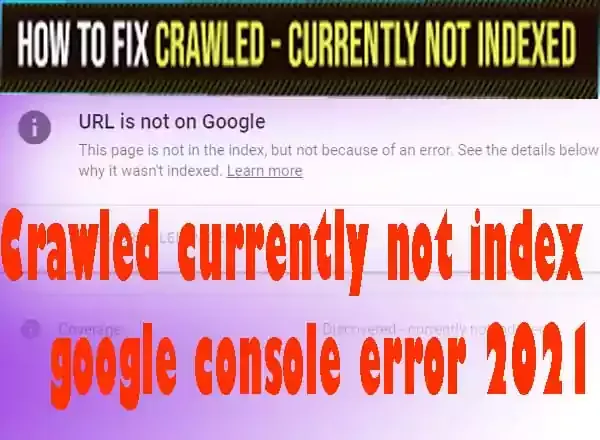
When Google says that there is no need to submit your URL again, you will not send it again until you improve your pages. It means that Google has found some issues on your page and decided to not index and in the future, if you improve the page may decide to index your page.
Is crawled currently not indexed a serious error?
There are no tensions if your URL in Crawled currently not indexed list but this is a worrying condition that your post or page is not indexing. The serious errors show in the error section with the red background colour.
So, this is not a serious error of Crawled currently not indexed but takes time to solve if you update the page or post. The impact is that your post will not show in search engines to your users and traffic will not come to your website. Due to this error of Crawled currently not indexed your other posts and pages will also affect you.
What are the possible reasons for the error Crawled currently not indexed?
- Duplicated content found on your post or page by Google or the Content of your posts is too competitive.
- Orphan pages found on your website have no Internal Linking to existing pages.
- User experience found null on your website
- Thin Content is exist on your website posts and pages
- Mislead links and broken links also found on your website pages and posts
How to fix the Google console error “Crawled currently not indexed”?
To fix this error Crawled currently not indexed, you have to follow the following steps and wait for the results. It may take a long time to solve but will be solved when crawl comes and crawl your page. To resolve the error of the Crawled currently not indexed, you can follow the below things to check.
- Check your 100% error first.
- Content should be Unique
- Unique Content should be more than 600 words.
- Google found Broken Links
- Good User Experience
- Share your posts and pages to different social Media and get backlinks
- Index your site with other search master tools like Bing and Yahoo.
- Increase or interlink the Internal Links
- Don’t do anything with paginated and RSS feed URL
- Reduce Click-Depth
- Manual request to indexing
1. Check your 100% error first.
You have to check every link URL available in Crawled currently not indexed. Sometimes it happened that your page or post is indexed but the error still shows in the dashboard. It is a late update of Google information. So, check first that your page or post has given a 100% error of Crawled currently not indexed on your Google Console dashboard.
2. Content should be Unique
Sometimes when Google bots crawl your website and find duplicate content on it or very competitive content on it, they may decide to keep your URL in Crawled currently not indexed section. You should have unique content and have to check those pages and posts which showed these errors of Crawled currently not indexed.
You may use online plagiarism tools to check your duplicate content. You can Use SEO tools website and Copyscape websites for checking content and erasing them from the posts. You may submit your request manually by doing this. 10% of words duplicate content is good but 10% of sentence duplicate content is bad for your website.
3. Unique Content should be more than 600 words.
The content you write should be more than 600 words of each post and page. You should Check your total words of your article and increase those by more than 600 words if you found less than.
4. Google found Broken Links
Broken eternal and external links are a big SEO tool and Indexing priority of your website. You paste the URLs into your website and they don’t work due to removing them, you also have to update them. First, find out through the dead link checker and remove or update these links.
5. Good User Experience
Your website should be a good user experience which means that your users may not face trouble opening pages on desktop as well as mobile, users easily navigate through the navigational bar and the user may go to other pages through interlinking your website link. You have to check that your theme or template supports both types of devices. You have to link these errors posts link with the indexed posts.
Provide these posts links in those posts so that Google understands their importance and index them immediately. If you are a blogger, may see the SEO-friendly templates here. You may use SEO tools online to check your themes, templates and Interlinking of posts’ URLs. You have to make your all URLs map and may link each other through internal linking to avoid Crawled currently not indexed.
7. Share your posts and pages to different social Media and get backlinks
You have to get the trust of Google and there is no manual way to tell Google that your post and page which is not going to be indexed has importance. You have to share your posts on social media and others platforms where Google get a referral link to your page and post. This will help you to index the post or page.
8. Submit your website with other search master tools like Bing and Yahoo
You have to submit your website and pages to other search tools like Bing and yahoo. Register there yourself and submit so that your URLs will watch by others and google index them after holding the issue of Crawled currently not indexed.
9. Increase or interlink the Internal Links
You should put unindexed posts and page URLs in index pages and posts. You should make a URLs map and link these with indexed posts. In this way, Google considers its importance and indexed it after crawling them.
10. Don’t do anything with paginated and RSS feed URL
You should don’t do anything with paginated and RSS feed URLs. Crawlers crawl through paginated and RSS URLs to complete the process. If you remove and do anything with them, Google will not index your post and pages. Because they often linked with each other using rel=alternate elements. So don’t do anything with them.
11. You have to reduce the Click in Depth
Click in depth means that your provided link does not lead the user to the destination. So Google considers them misleads. When the user clicks again and again on a given link it means that he is not able to reach the destination. So check the authentic and reliable links that users may not click three times.
12. Manual request to indexing
After applying the above tips you may request indexing manually. You may do this 3 to 4 times 12 hours intervals. Don’t request, again and again, this will maybe be trouble for you. Do only 3 to 4 times. But remember to set, submit and ping the Sitemap of your website. Do the last process as follows to fix Crawled currently not indexed.
- Update the robots.txt file on your WordPress or Blogger. Types of posts and pages sitemap. If you have a Blogger type this robots.txt.
- Now, open the GSC dashboard and go to the specific error page and click on a URL.
- On the left side, you will find the tester, click on it.
- Copy the robots.txt coding.
- Paste it on the tester page by removing the earlier coding.
- Click on the test first and then submit button. Now, click on submit to Google for the update.
- Now, you will ping Google that they crawl your website. Copy the URL and paste into the browser, replace your website URL and press enter key.
- Now, manually may request for indexing to Google.
Wait and wait
You should wait for fixing the problem. This may take a long time even 3 to 4 months to solve. So be patient and wait for the solution of Crawled currently not indexed.
Repost with new permalinks
It is hoped if you wait it will be fixed the Crawled currently not indexed. But don’t fix it after 4 months you have to new post with the new permalink. This tip will work and index your post and page. But it is recommended that you should wait for indexing instead of re-post with new permalinks.
Hope you like the post and will be shared with friends.
You May Also Join Us On:
- You can Join Our Facebook Page for Daily Updates:
- Follow Us on Pinterest to get daily Updates:
You may also like:
- How to Use Google Trends for SEO Growth
- How to completely remove Footer area from bloggers template
- Network Sharing Error “Windows Cannot Access Your Shared Drive or Folder”
- Fix Excluded pages issues of Google Search Console
- Best Blogging SEO Tools for Beginners in 2025
- Best Local SEO Tools to Boost Local Search Rankings
- How Internal Linking Can Elevate Your SEO Rankings and Conversion Rates
- What Are Featured Snippets optimization and How to Optimize in 2025?
- How Internal Linking Can Elevate Your SEO Rankings and Conversion Rates
- What Are Featured Snippets optimization and How to Optimize in 2025?