
DLC Boot for Multi Windows ISO
DLC Boot for Multi Windows is a very handsome and useful software for Multipurpose. This software is work as a Windows protector in your Windows. This is a medium and high-efficiency tool for the recovery of data from disks. You rescue your disks; format and many more actions may do with the help of this software. You may remove anti-virus from your disk throughout the software process. You can say that this is not only a software program but also it provides the others program with a good startup.
DLC Boot for Multi Windows or DLC program is used for recovery purposes of your windows. If you accidentally lost your windows and did not start its boot due to corrupt of some files. Your all data in windows drive have the chances to lost. This program of DLC Boot for Multi Windows acts as a windows operating system and able you to recover your file’s data which is available in the c drive of the windows.
DLC Boot for Multi Windows ISO
Because if you install new fresh copy of windows in your system, your windows drive data like folder on desktop and my documents will be lost. This mini DLC Boot for Multi Windows program be able you to recover all the data from your windows folder or drive easily. You may also want to visit and install the free screen recorder APowerSoft Pro version here.
Why do we use this software of DLC Boot for Multi Windows?
This program or software is also used in case of formatting the drive. If you by mistake format the drive and lost all the data, this mini Windows application enables you to recover your data from the drive easily.
This software has a many free software and tools and you may use them to take this type of help.
Top Features of DLC Boot for Multi Windows Program:
- This program helps in solving windows boot problems.
- It can take backup of your Windows and other dives easily.
- It may restore your partition with ease.
- This software has the same and advanced functions of Hiren DVD software.
- It is used to lock and unlock the windows.
- It may be used for hard disk formatting purposes.
- This software may be used to recover your hard disks partitions.
- This software has a user-friendly interface.
- It may be used for fixing the registry issues.
- It recovers the hard disks missing MBR.
- You may easily diagnose and fix the all virus involved and corrupted files easily.
- It can increase the performance of the system.
- This is easy tool to remove the virus.
- This is acts and work like a mini window.
Which operating systems may run in the DLC Boot for Multi Windows?
This program contains the all windows operating system and you may run any of them. You have to choose the operating system which you want to run and that windows will be opened you to. Even, if you don’t have hard drive in your computer, you may run this operating system and do your work there. The operating systems of the DLC Boot for Multi Windows are the following.
- MICROSOFT WINDOWS 10
Which programs contain the DLC boot?
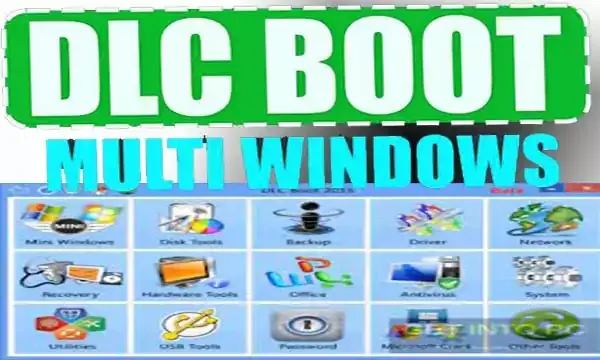
DLC Boot for Multi Windows ISO disks nearly have all the diagnosing tools and software which may help you to recover your wishes. If you have any problem in your system, you may choose that program accordingly. The list of the software is of the following which you may use for your windows and system issues.

- All Mini Windows Tools
- Office
- Antivirus
- Systems Tools
- Utilities Tools
- Disk Tools
- Backup & Restores
- Driver Tools
- Network Tools
- Data Recovery
- Hardware Tools
- USB Tools
- Password Remove Tools
- Others Tools
How do make a bootable DLC boot to run?
- First of all, please Download the DLC Boot software into your system.
- Now, extract it with WinZip software and then you will open it by clicking on the Downloaded file.
- When the DLC Boot software folder is opened, then you have to plug in your USB flash drive with your computer.
- Now, the DLC boot setup files and folder is visible to you and you will be clicked on DLC boot 2017 Win software.
- The software will be opened and now, you will see the option there and the layout of the software clearly and then click on the pen drive icon.
- Now, your all-flash USB drives will be shown to you. Select the drive which you want to make the DLC boot.
- After selecting the drive, click on a burn or run button.
- It will start to copy the DLC boo files and folders into your drive.
- You have done to make DLC boot into the USB drive.
How to run bootable DLC boot on the computer?
When your windows operating system completely does not support and run the windows due to corrupt files, you have to run the DLC boot on that computer to solve that problem. Let’s start to run DLC boot on a corrupted windows operating system for recovery purposes of windows files and folders on the desktop.
- When you have made the DLC boot on the pen or USB drive, you will restart your system.
- Now, you will boot your system from this USB drive and select boot options according to your system.
- Now, you have to select the mini windows option.
- Now, select the operating system which you want to run on the computer. There will be seen windows 7, windows 8and windows 10.
- Choose the Windows operating system and press enter.
- Your windows will start to run and a desktop will have appeared to you.
- Now, open the DLC boot software and diagnose your problem and fix it
Download DLC boot on the computer
You May Also Join Us On:
- You can Join Our Facebook Page for Daily Updates:
- Follow Us on Google News to get Daily Updates:
- Follow Us on Instagram for daily Updates:
- Follow Us on Pinterest to get daily Updates:
- Join Us on Twitter to get daily Updates:
You may also like:
- error 0xc00000a5 and 0xc000005 has been fixed
- emerging seo trends
- ema used for scalp trading and moving average
- elliott wave theory elliott wave indicator
- e commerce websites
- e commerce store running
- easy ways to save money
- earn claim free cryptocurrency
- disable windows 11 copilot
- digital currency and cryptocurrency project
- difference between macd and macd divergence
- demo trade on bitget exchange
- crypto trading analysis
- crypto tools and trading tools in crypto
- crypto predictions today
- crypto predictions and how to calculate
- crypto portfolio basic risk management


