
How to solve couldn’t fetch the page – error of Change of address tool in GSC 2025
Couldn’t fetch the page is the error of Google search console when you might try to migrate your old website to the new website using the Google Search Console address tool.
We migrated from old website to he new website.It appears we now have accomplished all necessities talked about here for utilizing the search console change of address tool and instrument. The error of the change address tool of Google search console “couldn’t fetch the page” solution in the current article now.
Couldn’t fetch the page Address change tool of GSC
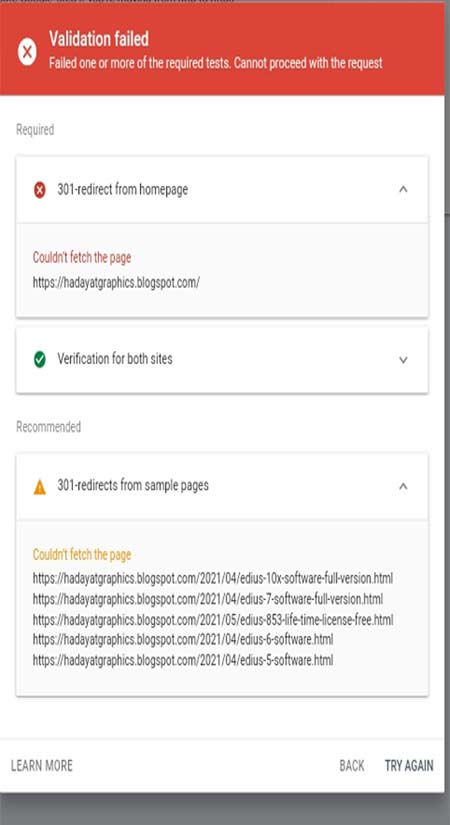
As already said that this type of error couldn’t fetch the page occurred at the time of migration of your old website to the new website. This is overall a temporary error if you apply the 301 permanent tool code in your previous or old website. Let’s discuss the reasons and solutions for the error of couldn’t fetch the page on the search console windows.
Why do We migrate the website address to another website address?
There may the different reasons for migrating your old website URL or the whole website to the new website address. There may be old blogs or websites that have traffic or less traffic, you want to divert your traffic to your new blog or website. There may also be that you might be migrated from blogger to Wordpress dashboard for your website. Whatever the reason you have, when you face the error of couldn’t fetch the page, we will solve it now on the current page.
What is the process of migrating the old website to the new website?
The process of migrating and using of GSC address change tool is very from blogger to Wordpress, blogger to blogger and Wordpress to Wordpress websites. The coding of 301 permanent codings is different in the above conditions but the common thing is that you put your 301 redirect code in your old website or blogger.
So, for the eligibility for using the GSC change of address tool, your old website should be properly redirected using 301 permanent code within the main directory. You can learn here how to migrate blogger to Wordpress here. The necessary steps of using the GSC change address tool are the following things you should be applied very carefully and correctly on your old blogger and website.
- Get the proper 301 redirect code of your blogger or Wordpress website. You can learn here about how to migrate from an old Wordpress to a new Wordpress website. You can also learn here how to migrate a blogger to a wordpress website.
- After getting the 301 redirect code, put it properly into your old blogger or wordpress website.
- Make the old blogger or wordpress website URL map to the new blogger or wordpress website and code it properly with 301 redirects including the home page.
- Now, go to the GSC and add a new website or if already added, use a change of address tool of GSC to change the URL.
At the last point at GSC, you will get the error couldn’t fetch the page. I do know you are bored with this bug, So we’re right here that can assist you to solve this error. Take a deep breath and have a look at the reason for your downside. We now have many options to this downside, however, we advocate you make use of the primary technique as a result of its examined & true technique that is just right for you.

How to solve couldn’t fetch the page – error of Change of address tool in GSC
This instrument will be present in GSC by clicking on settings on the left-hand facet. It’s used to tell Google that you have moved an internet site to a brand new area as a way to retain the area fairness of your previous area. To solve the error of couldn’t fetch the page follow the below steps.
- First of all, you will have to check that your domain or blogger URL is indexed or not indexed using the instant indexing tool of GSC.
- Resubmit the main URL of the domain or blogger URL for indexing purposes.
- Now, again use the address change tool to change the URL.
- If it again exists, you will have to wait for 48 hours.
- The google robot comes on your website and when it found the 301 redirect code on your old website, they index them.
- When indexed, you will be able to use the change of address tool in GSC.
- When the change address tool starts to work for you, you will have to put all URLs in the newly published posts for indexing fast.
- Remember, It may take more than 48 hours to a weekbut you should keep patience and keep checking daily the same process. Normally, it takes a week at maximum and for bigger sites it maximum takes one month.
My Success Story of using the GSC change of address tool.
I migrated my three blogger websites to one wordpress website recently. I used the wordpress plugin blogger to wordpress by getting the 301 redirect code for each of website. I was pissed about this for some time making certain redirects had been arranged appropriately and fetching pages manually via GSC to make sure they had been working appropriately.
Every little thing appeared fantastic, so I went to work on one thing else to provide my thoughts and a break from the problem. One of the three blogger websites was successfully accepted at the same time but two has the same issue of the error of couldn’t fetch the page.
Then I realised that the reason for the problem could also be that I had solely added the brand new domain to GSC a few hours earlier. For these that don’t usually add properties to GSC, chances are you’ll not know that it normally takes a couple of days for Google to start out gathering knowledge for the brand new domain. But this was wrong because my one blogger was successfully starting to migrate.
I confirmed this over the following few days by usually attempting to submit my change of address in GSC without success. I was daily checked and clicked on the tool but nothing happened except the same error of couldn’t fetch the page.
I resubmitted the change of address request to Google console as usually on the sixth day and it handed the validation the first time and I succeeded to use the change tool without any error. So, you will be patient for a week and daily check till the issue is solved of couldn’t fetch the page.
You May Also Join Us On:
- You can Join Our Facebook Page for Daily Updates:
- Follow Us on Pinterest to get daily Updates:
You may also like:
- backup large site using wordpress
- basic wordpress seo tutorial guide and wordpress seo tips
- best keyword research tools
- best remote desktop software
- best seo optimization to increase bloggers traffic
- best surfer seo alternatives
- best web hosting for wordpress
- best white label seo tools
- best wordpress theme
- bing seo 11 great tips
- black hat seo 7 tactics
- blogger to wordpress full guide to migrating your site
- bluehost wondersuite ai website builder



Wondering where to buy essays online? Choose a site with expert writers.
You can always request https://eliteessayworks.com/ – help with college essay writing assistance.