How Can You fix core web vitals in google page insight
Fix core web vitals appeared When your blogger takes time to load, there is a need to fix core web vitals and speed up the blogger. When your website takes a second more to load, it is considered a negative response from the website. It is like that is not able to deal with and handle the customers.
Website speed has a great impact on the business and ranking in search engines. If you found any errors regarding core web vitals, fix core web vitals immediately and speed up the blogger.
How to fix the core web vitals and speed up the blogger’s website?
If your website takes 3 seconds to load in the browsers, you will lose 50% of your visitors that time and they ignore it next time due to extra load time. But if you take measures to fix core web vitals, it is possible of returning your visitors in future. Thus, you can say that your unique content with the fast loading speed, increases the number of visitors to the website. When visitors or traffic increases, you know everything will be fined like AdSense revenue or ads revenue.
Google takes more importance to the visitors. Now, google indexes your website and pages on mobile devices first and then on desktop. Because 70% of visitors search from mobile devices, so, your website should be compatible with mobile devices as well. If you are a WordPress user, click here to know how to speed up a WordPress website.
How to check the loading speed of the blogger’s bogs?
There are a lot of online tools which take help and you may check your blogger loading speed and to fix core web vitals in google page insight. Google has developed this tool to check your website and page loading speed. Google also identify the weakness of the bloggers and suggest different ways and solution to solve and fix core web vitals. Just click the above google insight page link and type your website URL or page URL to check the core web vitals.
What are the core web vitals in google page insight?
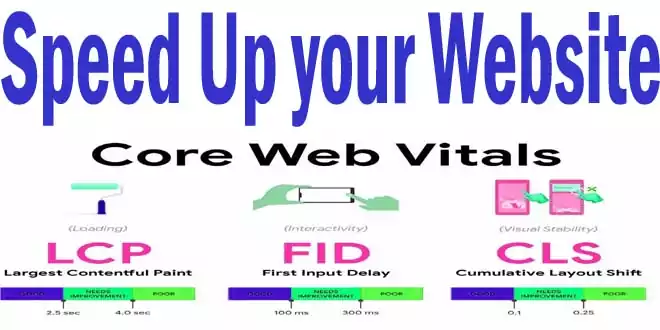
The core web vitals are the metrics to measure the page or website loading speed. these are also called signals and these metrics and signals measure the visually of your website’s core web vitals. These are the following.
Largest Contentful Paint (LCP)
The first metric known as LCP is most important in fix core web vitals. LPC is the factor that asked how fast the website or page is. LPC take into the following factors to measure the value of LPC in the fixed core web vitals.

- Largest images
- Render time
- Videos
- Texts Block Level
- Background Images
If he found nil user experience on your website, you critically need to take measures to load the website fast to create a good user experience. Fast loading of the page or website is not only a user experience but also ranks your site higher in googles eye.
LCP is measuring the time of your website that it takes to load from different content blocks within the user viewport which means users’ current screen whether mobile devices or desktops. This metric gives the signal, of how fast the content section renders on the visible screen to show to the users.
A website should take LCP within 2.5 seconds when a page starts for loading and if it takes more than 4 seconds it is considered not user experience and hence to focus on fix core web vitals.
Cumulative Layout Shift
CLS is the stability of the site’s linksbuttons and images which is measured in CLS and if it happened you must need to fix core web vitals in google page insight. You have to make your website easy with links and buttons and these should be stable while a user is reading the text. These metrics help to understand that your content, textbuttons, images and banners keep stable and don’t push around when a visitor is busy with content reading.
When an element changes its position, visitors may get confused which is not a good user experience. So, make possible content stability at the time of loading on the devices to avoid the issue of fix core web vitals. It considers the following into account. You should keep and maintain a CLS score of 0.1 or less on the test site or page.
- Layout shifts
- Buttons and links shift
- Impact fraction changes
- Distance fraction changes
First Input Delay (FID)
FID or First Input Delay is measured by the site or page responsiveness at the time of loading. When a page is start to load and you click on a button, it measures how quickly it works when a user gives input while loading.
You can say that FID only measures the records and events. These records and events are the clicks and key presses only. So, keep your FID below 100 milliseconds to provide a good user experience to the users and avoid the problem of fix core web vitals.
How to fix the core web vitals in google page insight and speed up the website?
There are some tips that you can increase the speed of your website. There is a lot of plugin for a WordPress website. But you may learn to speed up for your bloggers. You may speed up bloggers’ blogs by eliminating some effects.
Defer offscreen images
fix core web vitals has the Defer offscreen images also called lazy load images. You have made a picture gallery and when the user visited your gallery page, there may be two things about loading your images. The first may whole pictures be loaded at once whether the visitor did not see the images but the browser loaded them.
If the visitor may not have decided to see the below images and returned back, it is the total loss of the usage of the internet consumed on loading the deferred offscreen images. Google recommend using the lazy images attribute for the images so that when visitor scroll down to see the images, they it visible and loaded otherwise not.
- Find the <img tag from the HTML coding.
- Replace all above tags with <img Loading=”Lazy” attribute.
- It is better to use the sublime editor to replace it all at once.
- Click saves and your images will be applied as lazy load.
Remember every template did not support this attribute. For this, you may use java coding above the body tag and all will be done ok.
Eliminate render-blocking resources
When you’re complex and more coding of CSS and Javascript did not load timely and delay in loading, google provides it with an error and says it is a render-blocking resource and that is to be fix core web vitals. When a user visits your website, it starts to load from head to footer but website coding is loading from bottom to header. Thus, there are some restrictions that block to loading of the content.
So, make a coding that loads the page for the user by removing these render-blocking resources. For better and fast loading of your blogger, it needs to remove them. Remove all these URLs which you may find in eliminating render-blocking resources as follows in the table of fix core web vitals.
- Copy the URL from the page insight speed test and find it from the blogger’s HTML.
- When you found the exact URL, copy the whole URL and replace this URL in the coding.
- Now, copy the whole code and replace it with the whole URL code in the blogger.
- Save and do with all the URLs which you will find in the render-blocking resources.
Serve images in next-gen formats
Find the page =s16000 after making pictures size in actual and replace –s1600-rw and then save. If your theme is not supported then follow the second procedure to fix core web vitals.
Reduce unused JavaScript
Use b:js=’False’ from the HTML below tag and save to disable javascript coding. And likewise css=’False’ for CSS to fix core web vitals.
Ensure text remains visible during Webfont load
Reduce the impact of third-party code
Avoid chaining critical requests
- Copy all fonts found in this error and paste them into the code and paste the below header.
- Use next-generation images like web images on bloggers to load fast and stand the fixed core web vitals.
- Remove Extra Social Links or gadgets.
- Eliminate Render-Blocking Resources Objects CSS Through coding.
- Remove unused JavaScript and CSS coding in the template.
- Always Insert a jump break on the top of the page after the first paragraph.
- Always use bloggers’ Image sizes like 640×360 in size.
- Decrease or keep only necessary Bloggers’ sidebar gadgets.
- Decrease, Remove or keep only necessary things on the footer bar.
- Show only 4 to 5 posts on the main page or labels page should be shown so that you may not fact to fix core web vitals.
- Show only 3 ads on a page of AdSense.
- Always Choose Low designed template with less simple coding.
- Use fewer java scripts coding for fast speed.
- Don’t use custom fonts, always use or set template default fonts.
- Don’t use images as background in the template, keep the default.
You May Also Join Us On:
- You can Join Our Facebook Page for Daily Updates:
- Follow Us on Pinterest to get daily Updates:
You may also like:
- How to Use Google Trends for SEO Growth
- How to completely remove Footer area from bloggers template
- Network Sharing Error “Windows Cannot Access Your Shared Drive or Folder”
- Fix Excluded pages issues of Google Search Console
- Best Local SEO Tools to Boost Local Search Rankings
- How Internal Linking Can Elevate Your SEO Rankings and Conversion Rates
- What Are Featured Snippets optimization and How to Optimize?