How to Successfully Start a Blog 2025?
How to Successfully Start a Blog 2025: Learn today about creating a Successful and Start a Blog 2025 to get money online. If you are a beginner in the blogging field, you can start a blog in just a few minutes and less than an hour on your computer or mobile device.
By creating a blog, you do blogging in a professional way. When you have professional content and skills to do a thing very well and professionally way, you may Successfully Start a Blog to earn online.
How to Become a Blogger by creating a blog?
You can become a blogger by creating and running a blog online to facilitate the people and get the newcomers to help in creating and solving the issues of their newly created blog. You may simply create a blog by adopting the below 5 simple steps within an hour.
- Choose your blog niche, name and blog hosting to take a starter.
- Take a good start on your blog by installing WordPress on your hosting plan and connecting domain and hosting in case of separate purchasing situations.
- Pick up a simple WordPress theme, pluginand logo to make your blog you are own professional.
- Do Basic WordPress settings and Basic SEO for your newly created blog.
- Write compelling content on essential pages and create good unique and informational content that your readers love by reading out.
How can anyone Successfully Start a Blog free?
Are you a good content creator? Then why not start a good blog and become a blogger in the era of digital marketing? Even though some people start a blog, they bit knowledge about writing skills of content writing. It’s the value of content that makes your blog a higher rank. Every blogger should value the content and the reader who came to the blog to read.
You have successfully made the idea of Start a Blog and you don’t have any idea about it, we Techno Hadayat is here to explore everything to Start a Blog successfully. Below may find the full steps to Successfully Start a Blog on WordPress. There are many free platforms also available that provide you the free blog creation facility with their name extension like blogger.com. Blogger provides Blogspot to you as the subdomain.
You can Start a Blog free using these free platforms but we suggest buying a domain to attach to the blog. TLD domain is the key factor for ranking the blog in search engines. Although a blogger is a Google product and prefers to rank its product, a subdomain is not considered a good ranking factor among the experts.
You are getting confused with the choices to Start a Blog. First, decide which platform is going to choose whether blogger or WordPress for your Blog. In the current article, we are going to start a new blog on WordPress but if you have decided to Start a Blog free today.
Steps to create or Start a WordPress Blog
Below are the given a full step-by-step guide to Start a Blog. The beginners can follow these steps to Successfully Start a WordPress Blog.

- Choose your blog niche, nameand blog hosting to take a starter.
- Take a good start on your blog by installing WordPress on your hosting plan and connecting domain and hosting in case of separate purchasing situations.
- Pick up a simple WordPress theme, pluginand logo to make your blog you are own professional.
- Do Basic WordPress settings and Basic SEO for your newly created blog.
- Write compelling content on essential pages and create good unique and informational content that your readers love by reading out.
Choose your blog niche, nameand blog hosting to take a starter
The first thing in Successfully Starts a WordPress Blog is to choose the blog niche, blog domainand blog hosting. These are the three steps that should be taken very cautiously. Because these basic points and factors will help to rank your blog in the search results. Let’s discuss this briefly.
- First, you will have to select a blog niche on which you have some expertise. Always choose the niche in that you have some skills in the topic. To rank better n the search engines, choose the micro niche for your Blog so that you can write easily on the topics to explore the details. Here is the full guide about choosing niche techniques and steps that you can follow.
- The second thing is to search and buy the best domain name and hosting provider. You will have to search for the domain availability in the domain name providers search box. Always choose the TLD domain name putting the blog keyword in the URL. You can also read here about how to choose the domain name and domain providers. After searching and choosing the domain name, you will have to buy from the provider. Click to know the full process of buying a domain name.
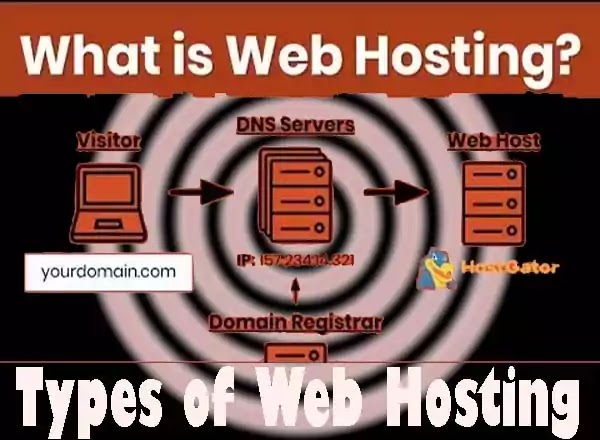
- The third thing is to choose the hosting provider and plans and buy the hosting. Always choose the best hosting provider with 100 percent uptime with easy backup facilities. Always select good and effort-able plans with good bandwidth. You may know the full process of buying a hosting here.
Take a good start on your blog by installing WordPress on your hosting plan.
The next step to Start a WordPress Blog is installing WordPress on the hosting plan. It’s free and open-source software to develop blogs and websites without knowing the knowledge of coding. WordPress is a good CMS software for front-end users to develop a professional website. To install WordPress, follow the below steps. So, install the WordPress application on the hosting to start a blog for you. You may learn here the full method of installing WordPress.
Pick and apply your simple WP theme to make your blog your own
The next step is to pick up the right and good WordPress theme for your blog. A WordPress theme is the design of your blog that is already full of coding for beginners. The WordPress theme makes coding easy for fewer knowledgeable experts. So, you may have to choose a good and responsive WordPress theme for your new blog.
There are many themes available and you will choose accordingly your niche and website structure. There are many themes available that many developers offer free of cost. You will have to buy a good theme for your blog but initially, you may start a blog with a free theme.
Do Basic WordPress settings and Basic SEO for your newly created blog.
The next step for Successfully Starts a Blog is the basic WordPress settings that you will do at the start time. WordPress has a settings tab where you will have to do all the basic settings as best for your blog. You can do the following settings for your WordPress.
- WordPress general settings
- WordPress Writing settings
- WordPress Reading settings
- WordPress discussion settings
- WordPress media settings
- WordPress permalinks settings
- WordPress privacy settings
The extra settings include the themes that you will have to do. Every theme has its own settings for SEO purposes, so, must do the theme settings by going to the theme customizations.
Write compelling content on essential pages and create good unique and informational content that your readers love by reading out.
The final step is to create mandatory pages and write content posts for your blogs. Mandatory pages include an about us page, contact us page, privacy page, disclaimer page and terms and condition page. You may take help from online tools to create mandatory pages for your Blog.
Start to write the unique content of posts that people love by reading. Content is everything for a blog and it is the content that makes your blog a brand by ranking in the search engines. Try to write in a good and unique style with easy and simple language. To create a post content, click on posts and then add new. You may like here to learn about how to write an SEO Friendly article for a blog.
Conclusions:
Congratulations! You have started a successful blog on WordPress. Now, your time is starting now for the blogging field. This is the time to make things amazing for enjoyment the of people in the shape of writing. Next stage, you should learn about post-writing skills, SEO skills and other blogging-related tips to rank your blog in the search engines. Hope you will like and share your precious comments below.
You may join us on Social Media:
You may also like:
advanced meta tag generator script for blogger
airbnb arbitrage
alexa rank checker blogger script
all in one video downloader script for blogger
amazon carrier central
amazon ddp shipment
amazon jungle scout competitor analysis
amazon same day delivery
amazon seller tax invoices
become an au pair