How to Use Access Control and Time Attendance Management Software 2025
Access Control and Time Attendance Management Software is the software for biometric attendance of the employees and students for an organizations and schools, colleges and universities. Biometrics is an automatic way of seeing a person based on a physical or behavioural factor among the measured features which are fingerprints detection, face detection, password detection and voice detection.
These unique detections like body images, fingerprints, faces, passwordsand voices may easily identify and confirm the best solution on the market today. Whether biometric technology has been spreading around for many years, now it makes biometrics more accessible to consumers, small business owners, large companies and public sector organizations.
Make attendance on Access Control and Time Attendance Management Software
Fingerprints are one of the strangest twists of nature. People may have built-in, easily accessible ID cards. It has a uniquely simple design and is makable to represent you personallyand is literally accessible. Are you thinking about this happening?
Fracture versions are created during a child’s lifetime and only the normal formation is genetically defined. Friction versions remain the same for life, growing to the size of adults only. They rebuild the same damage if not.
Features of Access Control and Time Attendance Management Software
This is a simple software by RIMS. You may access it easily by connecting with your network. You may import user or employees’ databases or Excel files instead of writing or typing them one by one. This supports up to 10 machines to detect.
How to Install Access Control and Time Attendance Management Software on a PC?
- Download the setup.exe file from here for Windows 7 and Windows 10 here. These are two different software for Windows 7 and Windows 10, so Download according to your system windows, it is no matter whether Windows bit32 or 64bit for Access Control and Time Attendance Management Software.
Software for Windows 7
Software for Windows 10
- Click on the setup.exe file and the installation installer will appear, select the location where you want to install the software and click the Next button. The software will install in just a minute.
- Open the software from the start menu and click the Next button.
- An administrator password window will appear, set an admin password. This password will be required every time when you open the software.
- Now put the name of your organization and logo.
- Now, set the rule of attendance. Set everything according to your needs in this setup because maybe later this will not happen and enable these settings. So do all settings now.
- Now set public holidays in the software.
- Now, set weekend and off days.
- Now, set the duty times of the organization.
- Write all department names in this section.
- Now, Click on Connect button to connect your attendance machine to the software.
- Click on Add Device button and select your connection type whether it is USB or Lan. If the network connection is required then put a static IP in the machine first and then put the same IP here for connection. Provide the machine ID and password if you applied.
- Congratulation your device is connected now.
How to Register a New Employee in Access Control and Time Attendance Management Software?
To register a new employee for the purpose of attendance for Access Control and Time Attendance Management Software, follow the following steps. Remember, your device should be connected to the software.
- Add employees in the machine with ID card no# and take fingers on the machine.
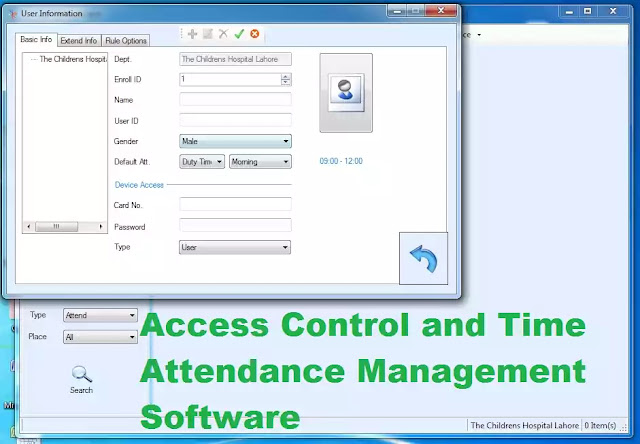
- Now, add the same employees in the software with all details and the ID card no# which is entered in the machine right above.
- Now, upload all usernames to the machine by clicking on empty space in user management. This will match the data with a machine.
- Now, collect data from the machine and generate a report you have to click on “Get all log” every time.
- Now, Take the report through query options.
- You may make monthly or daily generated reports there. You may export them in Excel form for print purposes.
- how to create pvc cards in coreldraw x7
- how to fix asus computer problems
- how to fix cant print on ms excel issue on windows
- how to fix envelope mode error of kyocera printers
- how to fix m1 url issues after
- how to get appear subdomain to google news
- how to install canon printer drivers on network
- how to install sql server in windows 7 with database application
- how to install wordpress in xampp
- how to make ghost of windows 7 and 10 in usb
- how to make youtube subscribe link
- how to solve couldnt fetch the page
You May Also Join Us On:


- You can Join Our Facebook Page for Daily Updates:
- Follow Us on Pinterest to get daily Updates: