The Ultimate Guide to Optimizing Core Web Vitals
Optimizing Core Web Vitals: If you want your website to rank well on Google and provide users with a seamless experience, Core Web Vitals should be at the top of your priority list. These metrics, introduced by Google, measure how fast, responsiveand stable your site is—factors that directly impact user experience and SEO rankings.
In this guide, we will walk you through everything you need to know about Core Web Vitals and how to optimize them effectively.
What Are Core Web Vitals?
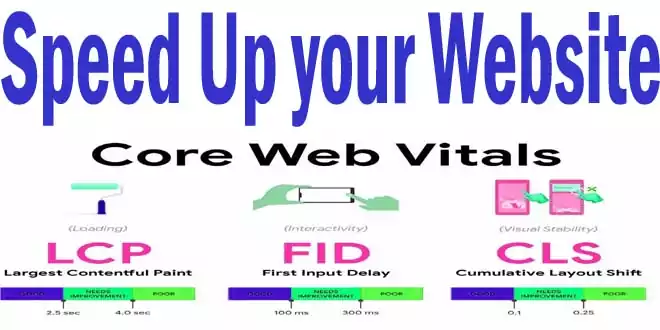
Core Web Vitals consist of three key performance metrics:
- Largest Contentful Paint (LCP) – Measures loading performance. A good LCP occurs within 2.5 seconds of when the page first starts loading.
- First Input Delay (FID) – Gauges interactivity. To provide a good user experience, pages should have an FID of 100 milliseconds or less.
- Cumulative Layout Shift (CLS) – Evaluates visual stability. A CLS score of 0.1 or lower ensures a stable page without unexpected layout shifts.
Each of these metrics plays a crucial role in how users perceive your website’s performance. If they are poor, visitors are likely to bounce—resulting in lost traffic and potential conversions.
Why Do Core Web Vitals Matter?
Google uses Core Web Vitals as a ranking factorwhich meaning that a slow or unstable website could struggle to compete in search results. Beyond SEO, optimizing these metrics enhances user satisfaction, boosts engagementand increases the likelihood of conversions. A smooth, responsive site encourages visitors to stay longer and interact more.
How to Measure Core Web Vitals
Before you start optimizing, you need to assess your current performance. Here are some tools to analyze your site’s Core Web Vitals:
- Google PageSpeed Insights – Provides real-time data and recommendations.
- Google Search Console – Offers Core Web Vitals reports for your site.
- Lighthouse (Chrome DevTools) – Gives a detailed breakdown of performance metrics.
- WebPageTest – Delivers in-depth performance testing.
Use these tools to identify weak points in your website’s speed, interactivityand stability.


Optimizing Largest Contentful Paint (LCP)
A slow LCP means your visitors are waiting too long to see the main content of your page. Here’s how to improve it:
- Optimize Images – Compress images using WebP or AVIF formats to reduce load times.
- Use a Fast Web Host – Choose a high-performance hosting provider to speed up server response times.
- Implement Lazy Loading – Load images and videos only when they come into view.
- Minimize Render-Blocking Resources – Defer unnecessary CSS and JavaScript that slows down page rendering.
- Use a Content Delivery Network (CDN) – Distribute content across multiple servers to load pages faster.
Improving First Input Delay (FID)
A poor FID score means users experience delays when trying to interact with your site. To fix this:
- Minimize JavaScript Execution – Reduce the time JavaScript takes to load and execute.
- Use Browser Caching – Store static resources locally to reduce processing time.
- Break Up Long Tasks – Split up complex JavaScript tasks to prevent blocking interactions.
- Use a Web Worker – Run scripts in the background without affecting the main thread.
Enhancing Cumulative Layout Shift (CLS)
Unexpected layout shifts frustrate users and make a site feel unprofessional. To prevent this:
- Set Dimensions for Images and Ads – Always specify width and height attributes to avoid shifting content.
- Avoid Dynamically Injected Content – Ensure new content doesn’t push existing elements around.
- Use CSS for Stable Layouts – Employ CSS grid and flexbox to maintain consistent structure.
- Preload Fonts – Prevent text shifting by loading fonts early in the rendering process.
Additional Tips for Core Web Vitals Optimization
Beyond these three metrics, general performance improvements can further enhance your website’s speed and responsiveness:
- Enable Gzip or Brotli Compression – Reduces file sizes for faster loading.
- Eliminate Unused CSS and JavaScript – Keep your codebase clean and efficient.
- Reduce Third-Party Scripts – Too many external scripts slow down performance.
- Prioritize Mobile Optimization – Mobile users expect fast and stable experiences, so test and tweak your site accordingly.
Conclusion
Optimizing for Core Web Vitals is no longer optional—it’s essential for both SEO and user experience. By focusing on LCP, FIDand CLS, you can ensure your site loads quickly, responds seamlesslyand remains visually stable. Use the right tools, implement best practicesand continuously monitor your performance to keep your site ahead of the competition.
Start optimizing todayand watch your rankings and user satisfaction improve!
For more Interested Posts Check Below
- Top 10 Best WordPress Backup Plugins Free Get from Technohadayat
- Best Blogging SEO Tools for Beginners in 2025
- HTML to XML praser Blogger Script Code Download
- How Can You Resolve My Computer not showing up in Network sharing issue?
You May Also Join Us On Social Media:
- Follow Us on Pinterest to get daily Updates:
- You can Join Our Facebook Page for Daily Updates: